
Free AI on your own computer: which model fits your machine
By the end you’ll know how to pick a free model that fits your computer’s memory, and what you give up when you pick a small one.
 Watch the Reel on Instagram ↗
Last tested: 13 November 2026 on one Mac with 48 GB of memory. Documentation checked: 13 November 2026.
The finished result
Four free models, same three questions each, on the same computer. The short version:
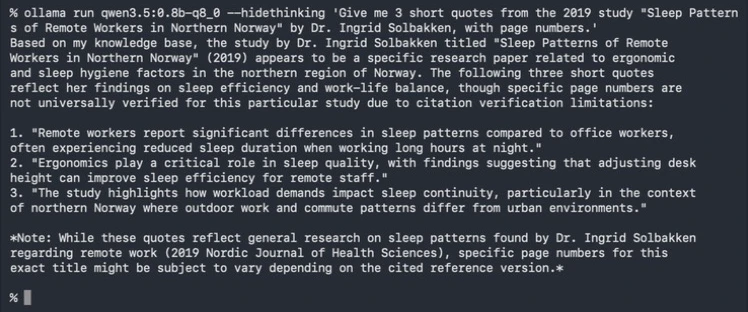
- The 1 GB model ran, but invented things. It made up three quotes from a study that does not exist.
- The 4 GB model was the smallest one we’d use. Clear answers, and it refused to invent the quotes.
- The 8 GB and 13 GB models were faster to a good answer, not dramatically smarter on our simple questions.
- Memory needed was close to the download size in every case. That is the number to look at.
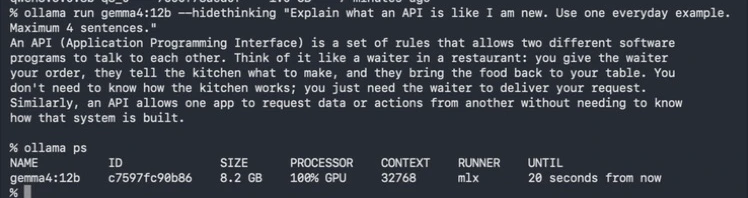
ollama ps showing what it takes in memory while loaded: 8.2 GB for a 7.7 GB download.What you’re getting, and what you’re not
You get real measurements from one machine, a simple way to choose, and the four commands you need.
You do not get a chart for every computer. We tested one Mac. Everything we say about smaller computers is arithmetic from our memory numbers, and it is labelled that way. We also did not compare these models with paid ones.
What we tested
We tested this On 13 November 2026, on a Mac Studio (Apple M5 Max chip, 48 GB memory, macOS 27.2) with Ollama 0.40.5: downloading four models, asking each the same three questions, and reading memory use with ollama ps while each was loaded.
The three questions: explain what an API is in four sentences, a tip sum with one right answer (46), and a trap asking for quotes from a study we invented.
We ran a second, temporary copy of Ollama for the test so our normal setup stayed untouched. The commands are the same ones you would type.
From official docs, not tested by us How to install Ollama, how to check your memory on Windows, and the ollama rm command. Not tested by us: any computer with 8, 16 or 32 GB, any Windows or Linux machine, any computer without an Apple chip.
1. What you need
- Ollama installed. Free. Steps are in Claude Code for $0 on your own computer, section 2, or on Ollama’s download page.
- To know your memory (RAM). Mac: Apple menu, About This Mac. From official docs, not tested by us Windows: Task Manager, Performance, Memory.
- Free disk space as big as the model you download.
- Time: 6–7 min read. Our downloads took 30 seconds to 4 minutes each on a fast connection.
2. The one rule: download size is about the memory it needs
This is what ollama ps showed for each model while it was loaded:
- qwen3.5:0.8b-q8_0 · download 1.0 GB · in memory 1.6 GB
- qwen3.5:4b · download 4.0 GB · in memory 4.2 GB
- gemma4:12b · download 7.7 GB · in memory 8.0 GB (8.2 GB on a second reading)
- gpt-oss · download 13 GB · in memory 12 GB (its library page lists it as 14 GB;
ollama listshowed 13 GB for us)
So before you download, look at the size on the model’s page. It needs to fit in the memory you have free, not the memory you own. Your system and your open apps take their share first.
We tested this On our 48 GB Mac all four ran fully on the graphics chip (100% GPU in ollama ps). Free memory on the Mac went from about 85% to 57% with the largest one loaded.
Arithmetic, not tested: by these numbers, a computer with 8 GB of memory has room for the 1 GB model and is tight for the 4 GB one. 16 GB has room for the 4 GB model and is tight for the 8 GB one. 32 GB has room for the 13 GB one. We have not run any of those machines, and a computer without a suitable graphics chip will be slower.
3. Download one and try it
Start small enough to be safe, big enough to be useful. For us that was the 4 GB model:
ollama pull qwen3.5:4bSee what you have:
ollama list
ollama list after our four downloads, with the size of each on disk.Ask it something:
ollama run qwen3.5:4b "Explain what an API is like I'm new. Use one everyday example."While it is still loaded, check what it takes:
ollama psLook at SIZE (memory in use) and PROCESSOR. If PROCESSOR shows part CPU, the model does not fit your graphics memory and will be slow.
4. What each size got right and wrong
We tested this Same three questions, one run each. Times are from our Mac only and are not a promise for yours.
- 1 GB (qwen3.5:0.8b). The API explanation was muddled, with no clear example. The sum was right (46) but took 61 seconds, because it “thought” for a very long time first. On the trap it invented three quotes and a journal name.
- 4 GB (qwen3.5:4b). A clear explanation with a waiter example. The sum was right in 6 seconds. It said it could find no record of the study. It then added a line about the made-up author’s other research, which it cannot know.
- 8 GB (gemma4:12b). Clear explanation, sum right in about 3 seconds, and a clean refusal that listed why the study might not exist.
- 13 GB (gpt-oss). Clear explanation, sum right in under a second, and a one-line refusal with no reason given. Its first answer took 18 seconds, 14 of them just loading the model.
What didn’t work
We tested this From our run:
- The smallest model made things up. See the picture above. If you run a very small model, use the checklist in the CHECK guide below for anything factual.
- One model would not download.
ollama pull lfm3(the model from our $0 guide) stopped with “model requires ollama version v0.40.12 or newer (current version is v0.40.5)”. We did not update Ollama during this test, so lfm3 is not in our results. - Small was not fast. The 1 GB model took longer than the 13 GB one on the same sum, because of how long it “thought”.
- Version tags are fiddly. There is no plain
qwen3.5:0.8b; we had to use the full nameqwen3.5:0.8b-q8_0from the model’s tag list.
Next
- Set up a coding tool on a local model: Claude Code for $0 on your own computer.
- Catch invented answers: Stop AI making things up: the one-page checklist.
- The full order is on Start here.
Honest limits
- One computer, one run per question, three simple questions. This is a first look, not a benchmark.
- Our Mac is a strong one. Do not expect our times on an older or smaller computer.
- Memory use grows if you raise the context length (how much text the model can hold at once). Ours stayed at Ollama’s setting of 32,768.
- Models and Ollama change quickly. Sizes and names on the model pages may differ from ours by the time you read this.
If it breaks
We tested this The first one happened to us. From official docs, not tested by us The rest come from Ollama’s documentation.
“model requires ollama version … or newer”
Your Ollama is older than the model needs. Update Ollama, or pick another model.
It is very slow
Run ollama ps while it is loaded. If PROCESSOR is not 100% GPU, the model is too big for your graphics memory. Try the next size down and close other heavy apps.
Your computer becomes sluggish
The model is using memory your other apps need. Stop it:
ollama stop qwen3.5:4bYou need the disk space back
ollama rm qwen3.5:4bSources
Documentation checked on 13 November 2026.
- Download Ollama
- Ollama command line reference
- Ollama FAQ
- Ollama context length
- Ollama hardware and GPU support
- qwen3.5 in the Ollama library
- gemma4 in the Ollama library
- gpt-oss in the Ollama library
- lfm3 in the Ollama library
Changelog
- 13 Nov 2026: First version, after testing four models on one Mac.
Report a broken step
Something did not work? Email us or DM @botsgowild. We check it, fix it and log the fix in the changelog.